> For the complete documentation index, see [llms.txt](https://docs.startrail.io/llms.txt). Markdown versions of documentation pages are available by appending `.md` to page URLs; this page is available as [Markdown](https://docs.startrail.io/startrail-sdk-js/introduction.md).

# Introduction

Wallet login and gas-free Startrail transactions for your web app — no crypto knowledge required from your users

`@startbahn/startrail-sdk-js` gives a web application everything it needs to put **blockchain-backed certificates (SRRs)** in front of ordinary users:

* **Login without a crypto wallet.** Google, Apple, X, LINE, Facebook and email — every user gets an Ethereum account (EOA) behind a familiar sign-in, powered by Web3Auth. MetaMask is supported for users who already have it.
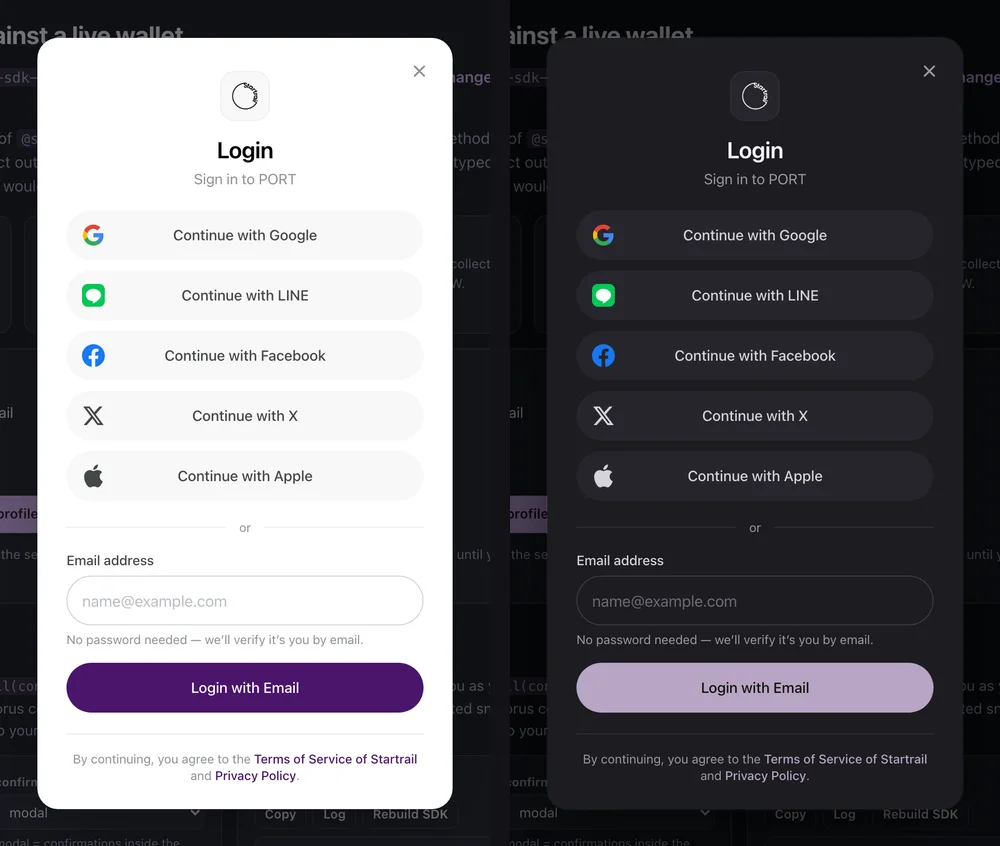
* **A login modal that looks like your product.** Redesigned in v2.3.0: white-label colours, logo, radii, dark mode and wording; accessible and mobile-ready; rendered by the SDK itself.
* **Sessions that just work.** A returning user is restored silently, even on a fresh page load; one flag switches accounts.
* **Gas-free transactions.** Users sign [EIP-712](https://eips.ethereum.org/EIPS/eip-712) typed messages and Startrail relays them on-chain as meta-transactions — no gas, no tokens, no seed phrases.
* **Signed messages for your own backend**, to connect the wallet identity to your user accounts.
* **Built for AI coding tools** — `llms.txt`, `AGENTS.md` and typed TSDoc ship in the package.

{% hint style="success" %}
**New in v2.3.0** — the white-label login modal with dark mode, session restore on fresh instances, `login({ forceLogin })`, and a hosted playground. Read the [change log](/startrail-sdk-js/change-logs/latest.md).
{% endhint %}

## 🎮 Try it live — nothing to install

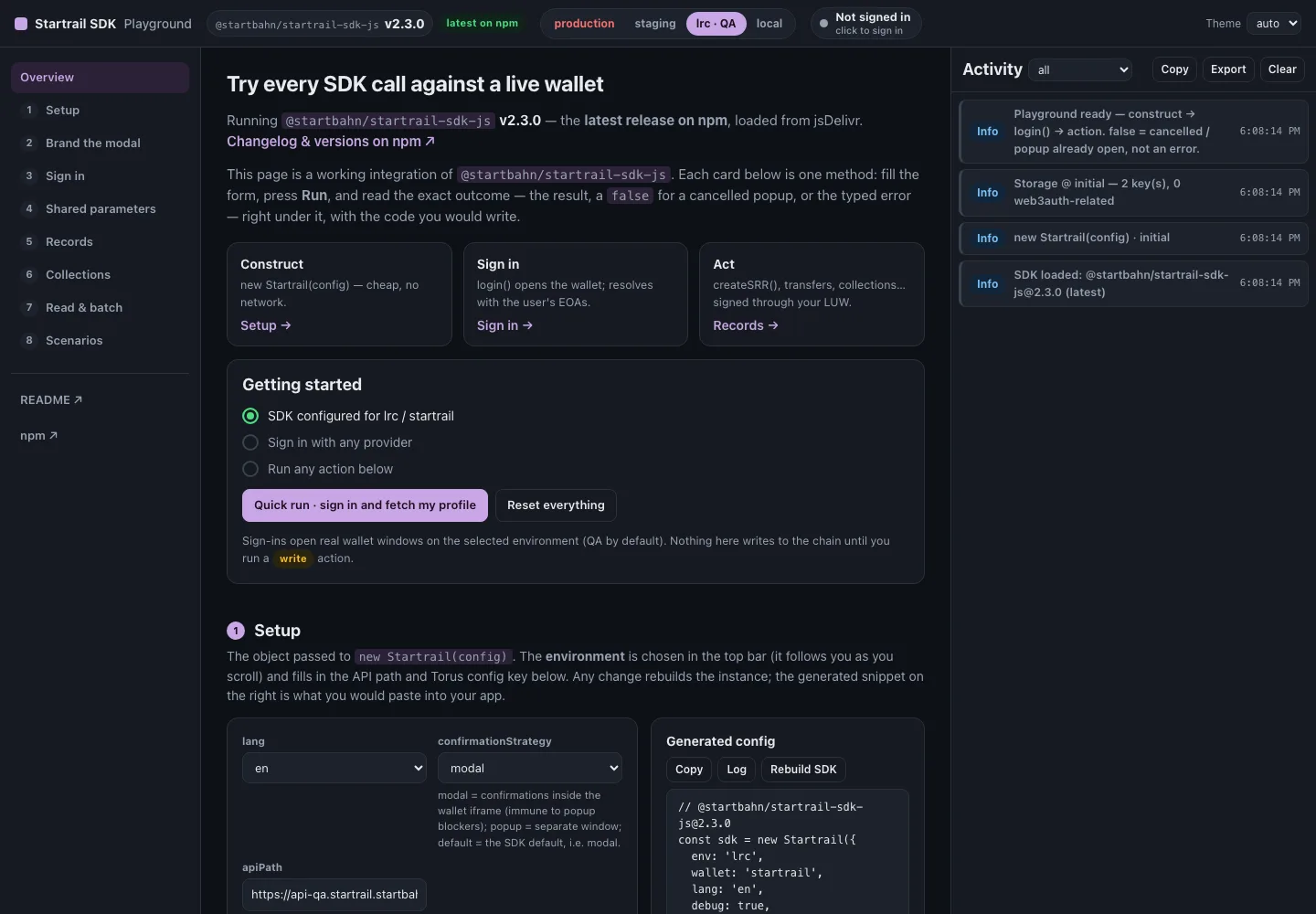
{% embed url="<https://sdk.startrail.io/>" %}
Startrail SDK playground — always runs the latest release on npm
{% endembed %}

<figure><img src="https://3244648189-files.gitbook.io/~/files/v0/b/gitbook-x-prod.appspot.com/o/spaces%2FOu6aN3RW264zdJsOQMJ2%2Fuploads%2Fgit-blob-854e5df3cbf1925634ec1f1753a7f6b2ea1c3104%2Fsdk-playground-overview.webp?alt=media" alt="The Startrail SDK playground: version badge, environment switch, session pill and one card per SDK method"><figcaption><p>Every SDK method as a card — fill the form, press <strong>Run</strong>, read the exact outcome and the code you would write.</p></figcaption></figure>

<table data-view="cards"><thead><tr><th></th><th></th><th data-hidden data-card-target data-type="content-ref"></th></tr></thead><tbody><tr><td><strong>▶️ Run every method</strong></td><td>Sign in with any provider on the test network, then create, update and transfer SRRs from cards that show the result, a <code>false</code> or the typed error.</td><td><a href="https://sdk.startrail.io/">https://sdk.startrail.io/</a></td></tr><tr><td><strong>🎨 Brand the modal</strong></td><td>Presets and every <code>customUi.theme</code> option with a live preview — then copy the generated config straight into your app.</td><td><a href="https://sdk.startrail.io/#brand">https://sdk.startrail.io/#brand</a></td></tr><tr><td><strong>🔁 Always the latest release</strong></td><td>The page loads the newest npm version at run time and shows it in the top bar; <code>?sdk=&#x3C;version></code> pins an older one for comparison.</td><td><a href="https://www.npmjs.com/package/@startbahn/startrail-sdk-js">https://www.npmjs.com/package/@startbahn/startrail-sdk-js</a></td></tr></tbody></table>

## 🎨 The login modal, in your brand

<figure><img src="https://3244648189-files.gitbook.io/~/files/v0/b/gitbook-x-prod.appspot.com/o/spaces%2FOu6aN3RW264zdJsOQMJ2%2Fuploads%2Fgit-blob-188f449f373a7981b49cd1263ca8e8233c71da0d%2Fsdk-login-modal-brand-port-light-dark.webp?alt=media" alt="The login modal themed for PORT in light and dark mode"><figcaption><p>One <code>customUi</code> block: accent colour, logo, pill-shaped buttons, dark mode — all from config.</p></figcaption></figure>

{% content-ref url="/pages/ArKSzO1J1eosVczBoEWW" %}
[Whitelabeling/Customizing](/startrail-sdk-js/login-providers/whitelabeling.md)
{% endcontent-ref %}

## ⚡ Three calls to your first certificate

{% stepper %}
{% step %}

### Construct

```typescript
import { Startrail } from '@startbahn/startrail-sdk-js'

const sdk = new Startrail({ env: 'staging', loginProvider: ['google', 'apple', 'email_passwordless'] })
```

{% endstep %}

{% step %}

### Sign in

```typescript
const eoas = await sdk.login()   // opens the login modal; EOA[] | false when the user closes it
```

{% endstep %}

{% step %}

### Act

```typescript
const srr = await sdk.createSRR({
  isPrimaryIssuer: true,
  metadata: { name: 'Artwork #1' },
  artistAddress: '0xArtist…',
  lockExternalTransfer: false,
  startrailLUWContractAddress: '0xLUW…',
})
```

Write actions trigger `login()` themselves when the user is not signed in yet.
{% endstep %}
{% endstepper %}

{% content-ref url="/pages/AeEWJ4Ga69G0zsAn3wPa" %}
[Getting Started](/startrail-sdk-js/getting-started.md)
{% endcontent-ref %}

## 🤖 Built for AI coding tools

From **v2.2.0** the SDK ships first-class resources for LLMs and AI coding agents, so tools like Claude, Cursor and Copilot integrate it correctly with minimal context.

<table data-view="cards"><thead><tr><th></th><th></th><th></th></tr></thead><tbody><tr><td><strong>📄 llms.txt</strong></td><td>Machine-readable API reference — install, lifecycle, every method signature, the environment table and the error catalogue.</td><td>Bundled in the npm package:<br><code>node_modules/@startbahn/startrail-sdk-js/llms.txt</code></td></tr><tr><td><strong>🤖 AGENTS.md</strong></td><td>Rules and the canonical <code>construct → login → action</code> pattern for agents writing code against the SDK.</td><td>In the SDK source repository</td></tr><tr><td><strong>💬 Typed TSDoc</strong></td><td>Rich hover docs and autocomplete on the public class and request/response types, straight from your editor.</td><td>Bundled in the package types</td></tr></tbody></table>

{% hint style="info" %}
Point your AI assistant at `node_modules/@startbahn/startrail-sdk-js/llms.txt` for an accurate, version-matched reference instead of relying on its training data.
{% endhint %}

We will use the words SDK and Startrail-Sdk-Js interchangeably within the rest of this document.

## Table Of Contents

* [Getting Started](/startrail-sdk-js/getting-started.md)
  * install, configure and construct the SDK
* [Wallet Methods](/startrail-sdk-js/wallet-methods.md)
  * `login` (incl. `forceLogin`), `logout`, `getUserInfo`, `signMessage`, `switchLanguage`
* [Startrail API Methods](/startrail-sdk-js/startrail-api-methods.md)
  * methods calling Startrail API from SDK
* [Login Providers](/startrail-sdk-js/login-providers.md)
  * social (SNS) and email login, the login modal and white-labeling
* [MetaMask](/startrail-sdk-js/metamask.md)
  * browser-extension wallet support
* [Authentication Integration](/startrail-sdk-js/authentication-integration.md)
  * integrate user authentication with your backend system
* [Error Catalogue](/startrail-sdk-js/errors.md)
  * error responses from SDK
* [Change Logs](/startrail-sdk-js/change-logs.md)
  * what each release changes — start with [v2.3.0](/startrail-sdk-js/change-logs/latest.md)


---

# Agent Instructions
This documentation is published with GitBook. GitBook is the documentation platform designed so that both humans and AI agents can read, navigate, and reason over technical content effectively. Learn more at gitbook.com.

## Querying This Documentation
If you need additional information that is not directly available in this page, you can query the documentation dynamically by asking a question.

Perform an HTTP GET request on the current page URL with the `ask` query parameter, and the optional `goal` query parameter:

```
GET https://docs.startrail.io/startrail-sdk-js/introduction.md?ask=<question>&goal=<endgoal>
```

`ask` is the immediate question: it should be specific, self-contained, and written in natural language.
`goal` is optional and describes the broader end goal you are ultimately trying to accomplish on behalf of the user. GitBook uses it to tailor the answer towards what is most useful for that goal.

The response will contain a direct answer to the question and relevant excerpts and sources from the documentation.

Use this mechanism when the answer is not explicitly present in the current page, you need clarification or additional context, or you want to retrieve related documentation sections.